


TRANE ComfortLink II XL1040 zone sensor TZON1040AC52ZA
In a zoned home, each zone needs its own control point.
Quick facts
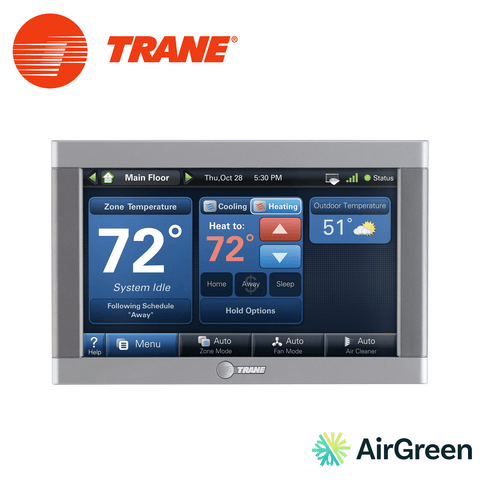
In a zoned home, every zone needs its own point of control. The Trane ComfortLink II XL1040 TZON1040AC52ZA fills that role elegantly: it is a communicating zone sensor with a 4.3 in colour touchscreen that displays the zone's temperature and humidity and lets you adjust its setpoint right in the room concerned.
A colour screen in every secondary zone
Its role in the system
The XL1040 is the secondary zone control for Trane ComfortLink II zoning systems. The XL1050 main control manages the system as a whole, and the XL1040 goes in the other zones: the bedroom floor, the basement, the office. It connects to the ComfortLink II zone panel through a 3-wire communicating link. It has no Wi-Fi connection of its own: remote access goes through the XL1050 and the Trane Home app.
What it displays
The XL1040 displays the zone's temperature and relative humidity. It can also display the outdoor temperature, taken from the system's registration in Trane Home or from a wired outdoor sensor. Readings are shown in Fahrenheit or Celsius.
Schedule and override
The zone's schedule is set from the XL1050 or from the Trane Home app. For a one-off need, an override changes the setpoint temporarily, and permanent hold keeps a set temperature until further notice. The people in the zone thus stay in control of their comfort without going through the main control.
Practical details
The screen cleaning function temporarily disables the touch input so you can wipe the screen without changing any setting. The software updates locally or remotely, so improvements can be added without replacing the device. The sensor operates from 32 to 120 °F and from 5 to 90% relative humidity, non-condensing. It measures 5.43 in wide, 3.39 in high and 1.30 in deep, with a silver finish.
Who it is for
The XL1040 suits zoned homes where you want a real screen in every zone, not just a sensor that shows nothing. It is especially appreciated by families whose bedrooms are upstairs, owners of a finished basement used as a family room, and people working from home who want to adjust the temperature of their office without going down to the ground floor.
XL1040 or basic sensor
In a ComfortLink II system, each zone can also use a ZZSENSAL0400AA wired indoor sensor, which has no screen. This sensor measures the zone's temperature but does not let you adjust it on the spot: the setpoint is then set from the main control. The XL1040 adds the touchscreen, the humidity display and local override.
Technical specifications
- Zone sensor with 4.3 in diagonal colour touchscreen (4.15 x 2.65 in)
- Systems: Trane ComfortLink II zoning
- Connection: 3-wire communicating link (no Wi-Fi of its own)
- Displays zone temperature and relative humidity
- Displays outdoor temperature (Trane Home registration or wired outdoor sensor)
- Zone schedule set from the XL1050 or Trane Home; override and permanent hold on the XL1040
- Screen cleaning function
- Fahrenheit or Celsius display
- Upgradable software, local or remote updates
- Operating range: 32 to 120 °F, 5 to 90% RH non-condensing
- Compatible with: XL1050 (TZON1050AC52ZA) and ComfortLink II zone panels; Trane Home
- Dimensions: 5.43 in W x 3.39 in H x 1.30 in D
- Silver finish
Installation by AirGreen
The installation
Our technicians choose where the XL1040 goes in the zone, on a representative interior wall, away from air vents and sunny windows. The sensor is connected to the zone panel through the 3-wire link, then recognized by the system. We configure the zone, check communication and set up the schedule with you.
Maintenance
Use the cleaning function before wiping the screen with a soft, dry cloth. Software updates keep the device up to date.
Why AirGreen
AirGreen Inc. is a family-owned HVAC company from Montreal, in business for more than 15 years, holding an RBQ licence, with a showroom in Boucherville. We install central systems and complete zoning solutions, from the main control to the sensors in each zone.
For the purchase and professional installation of the Trane ComfortLink II XL1040 TZON1040AC52ZA zone sensor, contact AirGreen. We serve Montreal, Laval, Longueuil, the North Shore and the South Shore.
Key facts: TRANE ComfortLink II XL1040 TZON1040AC52ZA
Four things to know, then its ID card in twelve answers. “—” means the manufacturer does not publish it.
The TRANE ComfortLink II XL1040 TZON1040AC52ZA or its closest sibling?
The most useful comparison: the model right next to it in our catalogue.
Products that go with the TRANE ComfortLink II XL1040 TZON1040AC52ZA
Parts named in its spec sheet that we sell and install.
Installed and set up by our technicians, in five steps
What we do at your place, in order. The on-site estimate is free.
- 01CompatibilityExisting system and thermostat checked before ordering.
- 02MountingInstalled in the most representative spot.
- 03ConnectionWiring or wireless pairing, depending on the model.
- 04SettingsSet-up in the thermostat or the app.
- 05TestOperation checked with you.
TRANE ComfortLink II XL1040 TZON1040AC52ZA specifications
From the manufacturer’s sheet. Type a word: the list filters as you write.
No line matches. Try another word.
Frequently asked questions about the TRANE ComfortLink II XL1040 TZON1040AC52ZA
Short answers, no detours.
What does the TRANE ComfortLink II XL1040 TZON1040AC52ZA work with?
According to the manufacturer’s sheet: Trane ComfortLink II zoning.
What is the warranty?
5 years, per the manufacturer’s information.
Does AirGreen install it?
Yes. We sell and install this product in Montréal, Laval, Longueuil, the South Shore and the North Shore. The on-site estimate is free.
No question matches. Call us at 514 316-2973.
Your thermostat, installed and set up by our technicians
We check your system and wiring, install the thermostat, connect it and program it with you. One visit, one installed price.